We all know that repeaters have public keys just like Companions. Just as with Companions the public key identifies the repeater on the network. By default a new repeater install will default to 1-byte hash.
At the network level this really does not cause any real problem. But at the management level of the network it can have undesirable effects.
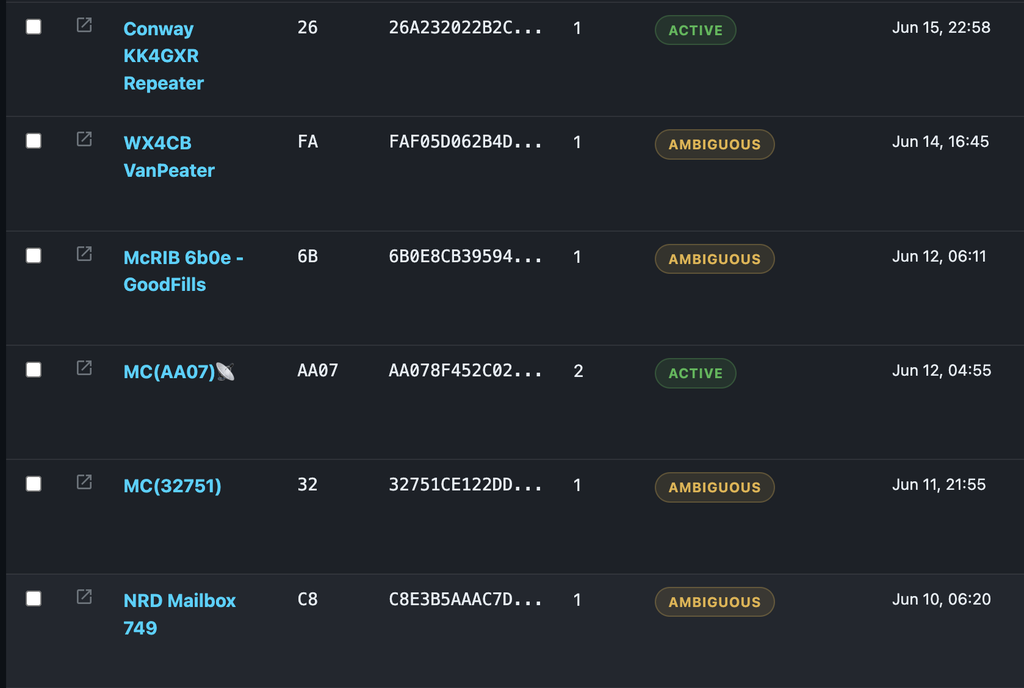
This is a a screen shot from the MeshMapper admin dashboard listing a number of repeaters. You will notice that nearly all of the repeaters are setup for 1-byte hash (second column showing the “ID”). Now if you look over a bit further you will see almost all the repeaters using 1-byte has as being classified as ambiguous. The Conway repeater (ID 26) has been fortunate thus far of not having another repeater who’s public key starting with 26. As soon as another repeater comes up starting with 26 and is heard, both it and the Conway repeater will be labeled as ambiguous.
The only repeater (in this screenshot) using multibyte hashing is MC(AA07) which uses a 2-byte hash. Lets look at another example.
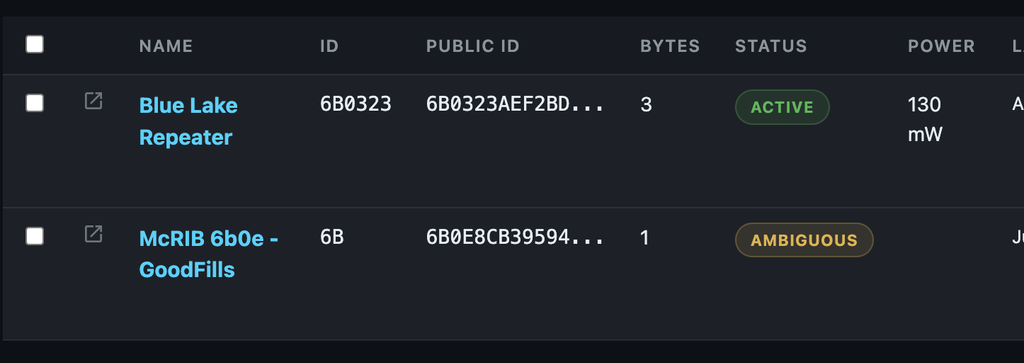
Here we see the Blue Lake repeater using 3-byte hash and is correctly identified without a conflict. The McRIB repeater is using a 1-byte hash and is showing a conflict. It shows up as a conflict because 6B matches both the Blue Lake and McRIB repeaters.
Using multibyte hashes on the repeaters avoids ID collisions and allows the repeaters to be seen uniquely on the network by various dashboards and administrative tools. In addition, using multibyte hashes improves the mapping and analysis tools like MeshMapper and LetsMesh as repeaters are correctly identified and the routes a packet takes through the network become more precise.
So setting up your repeaters to use multibyte hashes is a good thing and should always be done. And it is trivially easy to do. If you are using the repeater configurator on flasher.meshcore.io, then at the bottom of the page there is a check box for advanced options. Hit that and you will find the multibyte setting right there.
But what do you do to the repeater that is already deployed in a tree or on top of a building and it is just darn inconvenient to try to access the repeater to configure it again with the repeater configurator. Well you can make the change to a running repeater through the CLI. You don’t even have to be close to the repeater to do it. Enter the CLI and execute the following command: set path.hash.mode 1. The 1 specifies 2-byte hash and a 2 will specify a 3-byte hash. It is best to reboot after making the change.
I actaully don’t setup repeaters that are not using 3-byte hashes any more because I am tired of seeing the conflicts. It does not have an impact to the traffic or how you operate the repeater. The only impact is that the repeater’s adverts and remote management will now use 3-byte paths which limits the number of hops to 21 repeaters. If you think that is limiting, then I ask that you show me a network where you would need to exceed 21 hops. There are a couple out there, but the point being that 90% of the networks out there have at the most 7-9 hops.